
Twilight
How to set up the Twilight component in Ilevia Manager to trigger scenes at sunrise and sunset based on geographic location.
Introduction
Typically, a light sensor with a threshold level is used to trigger scenes at sunrise and sunset. You can replace the light sensor with this component, which lets you trigger scenes at sunrise and sunset by defining the customer's geographic location.
Use cases
The user wants to set scenes that will be triggered automatically at the established time of sunrise and sunset.
The user wants to set different brightness levels depending on the time of day. Click here for more information about this option.
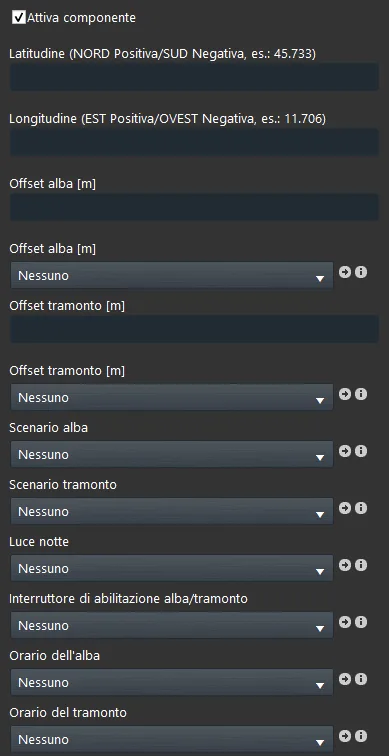
Component properties
The Component Title and Icon can be customized. See the “Common properties” guide.
GUI
This component was created using the Graphic UI gateway.
You can refer to the chapter “Gateway / protocols” for further information.
Enable component: Checkmark that defines when the function is enabled and when it is disabled.
Latitude and longitude: The parameters are required to define sunrise and sunset times in the system.
Latitude: (NORTH positive, SOUTH negative) e.g.: 45.733 ;
Longitude: (EAST positive, WEST negative) e.g.: 11.706 ;
Note: Latitude and longitude values must be separated using the dot character.
Sunrise offset [m]: Numeric value used to advance or delay sunrise time in minutes.
Sunrise offset [m] (adjustable value): Using an Adjustable value component, you can control the offset time in minutes directly from the Ilevia Control app;
Sunset offset [m]: Numeric value used to advance or delay sunset time in minutes.
Sunset offset [m] (adjustable value): Using an Adjustable value component, the user can control the offset time directly from the Ilevia Control app;
Note: These values must be negative to advance and positive to delay sunrise/sunset.
Sunrise scene: Scene components that must be triggered at sunrise (optional);
Sunset scene: Scene components that must be triggered at sunset (optional).
Night light: Switch component that is always on during night hours (optional);
Sunrise/sunset enable switch: Switch component that defines whether the function is enabled or disabled;
The switch can be added in the user interface to allow the user to disable/enable the twilight function.
Sunrise time: Using an info component, you can see the exact sunrise time for your specific location.
Sunset time: Using an info component, you can see the exact sunset time for your specific location.
Help
The Twilight component can be configured simply by using the component drag and drop feature. To set the component parameters, you can use the options list, or add them from the “Components” section to the component selection field.
Reminder before you continue:
Download and install the Ilevia Logic plugin to enable plugins (link);
After uploading the project to the Ilevia server, wait a couple of minutes for the logic to start.