
Variables: Boolean, Number, String, Color
The nodes in the Variables category of the Flow: boolean, numeric, text, and color variables used to store values, set constants, and preserve a state even after the server restarts with Persistent value.
Variables hold a value: they receive it at the Value input, store it, and output it at the Value output. They are used for three purposes:
constants: a fixed number, text, or color to use in a comparison or to send to a component (for example a 21 °C setpoint);
memory: the state of an operating mode (holiday, night, guests) that multiple parts of the flow read;
persistent values: a state that must survive a server restart.
Node | Type | Initial value |
|---|---|---|
Boolean | On/off | Off |
Number | Number | 0 |
String | Text | Empty |
Color | Hex color ( |
|
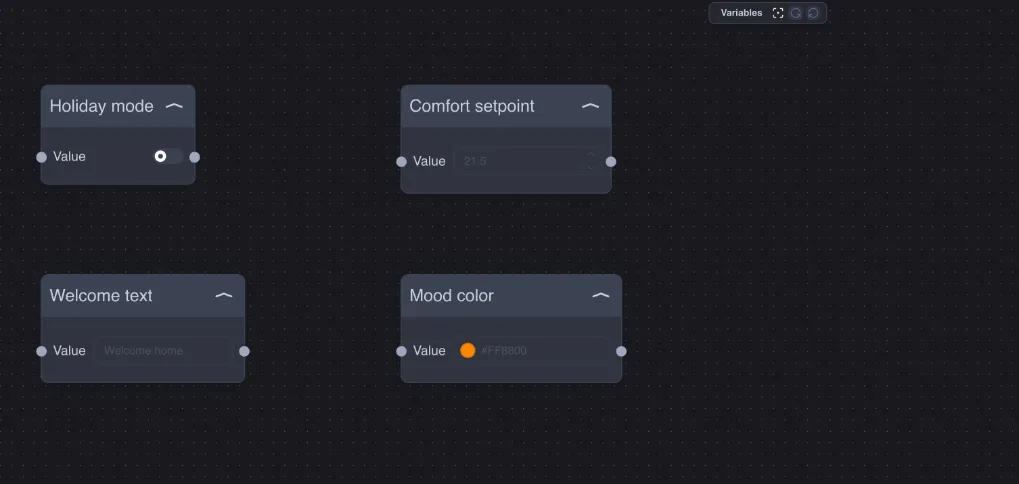
The initial value is set in the Properties window, in the value field. A value arriving at the input replaces it and is immediately sent to the output.
Persistent value
With Persistent value enabled, the server saves the value to its database at every change and, when the server or the Logic module restarts, the variable resumes from the last saved value instead of the initial value.
Example — holiday mode: the Boolean variable Holiday mode with Persistent value enabled. If the server restarts during the holiday (for example after a power outage), the logic restarts knowing that the house is empty and does not re-enable the normal routines.
Use Persistent value for states you define yourself (modes, preferences, important counters). It is not needed for values that arrive continuously from a sensor: they would be saved at every reading.
Usage examples
Comfort setpoint: a Number variable set to 21 connected to IN B of an IF or to the input of the Javascript node of the hysteresis thermostat. To change comfort, just change a number.
Welcome message: a String variable Welcome home sent to an Info component in the app when the alarm is disarmed.
Ambient color: a Color variable with the preferred color, read by a Javascript node that converts it into Hue, Saturation, and Brightness for an RGB light.