
KNX nodes: Feedback and Command
The KNX nodes in Flow: Feedback reads a group address, Command writes to a group address. Choice of datapoint type (DPT), address, composite DPT fields, gateway requirements, and examples.
The nodes in the KNX category work directly on the KNX bus group addresses, without needing to create a component in Ilevia Manager for each address:
Feedback listens to a group address and outputs the values passing on the bus;
Command receives values on the inputs and writes them to a group address.
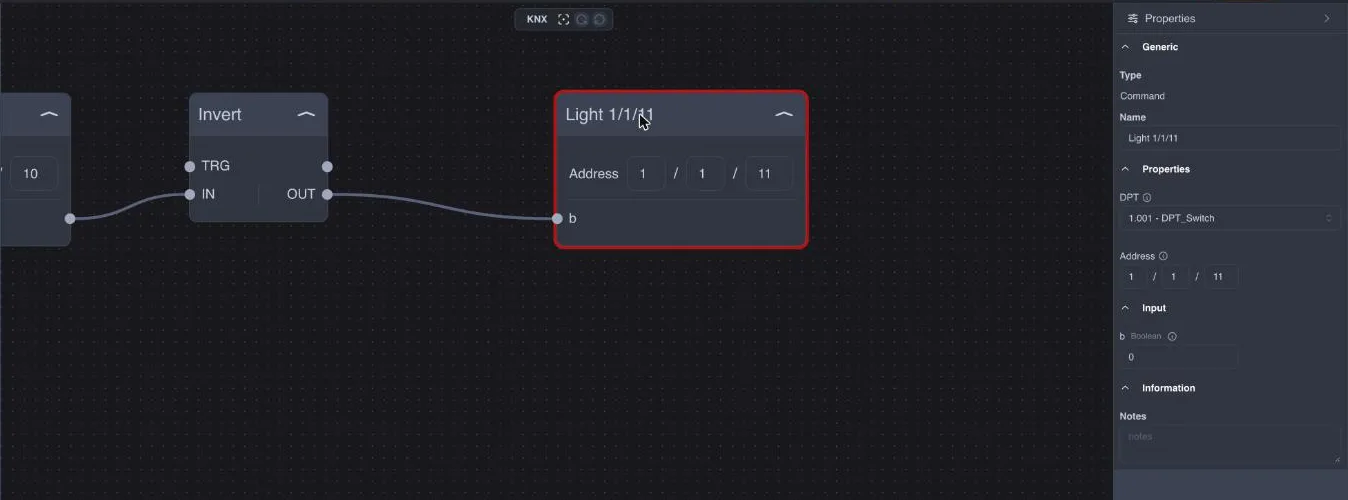
Configure a KNX node
Add a Feedback or Command node from the KNX category in the Operators window.
In the Properties window, choose the DPT (datapoint type) from the list, for example 1.001 – DPT_Switch for an on/off command or 9.001 for a temperature. It must be the same DPT as the communication object in ETS.
Enter the Address in the three fields (main group / middle group / subgroup), for example
1/1/11. The same address can also be entered directly on the node.After selecting the DPT, the node shows the DPT fields: for simple DPTs, a single field (for DPT 1 it is called b); for composite DPTs, one field for each part.
For the list of DPTs and the meaning of the fields, see Gateway Knx: supported parameters and datatypes (DPT).
Feedback
Every telegram that passes on the bus with that address updates the node outputs. With a composite DPT, each part is output on a separate output: for example, a date/time DPT provides separate outputs for day, hour, and minutes.
Example: a KNX pushbutton on 1/1/10 read by a Feedback DPT 1.001 becomes a flow event, even if no Manager component uses that address.
Command
When an input receives a value, the node writes a telegram to the bus at the configured address.
With a composite DPT, Command writes to the bus only when all its fields have received a value. Connect all inputs, or set fixed fields with a variable.
Example: inverted pushbutton
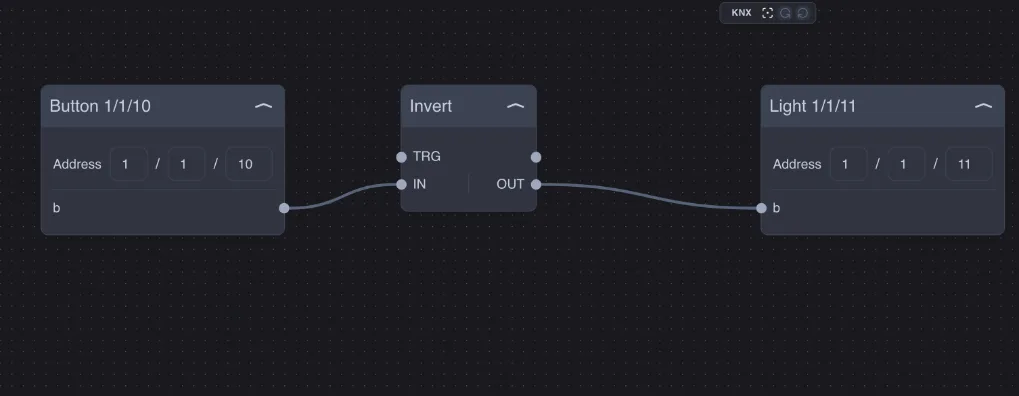
The pushbutton on 1/1/10 controls the light on 1/1/11 in reverse: button on = light off.
Other uses:
bridge between lines or systems: a value read from KNX sent to a component of another protocol (Modbus, DALI, Zigbee…);
centralized commands: a Feedback "all off" that, through a Scenario, switches off many addresses in sequence;
calculations on the bus: two temperatures read with Feedback 9.001, their average with Math, the result written with a Command 9.001 for a KNX display.
Requirements
The project must contain only one KNX gateway of type Knx3: the KNX nodes use that one, without needing to select it. With multiple KNX gateways, or with a gateway of the previous type, the KNX nodes do not communicate.
The gateway must be active and connected to the bus; the connection status is shown in Ilevia Manager.
Writing to an address used by real actuators actually controls them: test the flows first with free addresses or in a test system.