
Sequences: Sequencer and Scenario
The nodes in the Sequences category of Flow: Sequencer, which switches outputs on one at a time for their own duration, and Scenario, which sends a series of commands at regular intervals. Properties, commands, and examples.
The nodes in the Sequences category execute actions one after another over time, without needing to build a chain of timers.
Sequencer
Switches the outputs one at a time, each for its own duration: first OUT for DELAY seconds, then OUT 1 for DELAY 1 seconds, and so on. When one output turns off, the next one turns on.
Property / input | Meaning |
|---|---|
IN | Starts the sequence when it changes from off to on. If the sequence is already running, the command is ignored. |
Reset | Stops the sequence and turns off all outputs. As long as Reset remains on, the sequence does not restart. |
Cyclic | If on, at the end of the last output the sequence starts again from the first, until Reset. |
OUT, OUT 1… | The sequence outputs. The Add button adds one. |
DELAY, DELAY 1… | How many seconds each output stays on: from 1 to 43,200 seconds (12 hours). |
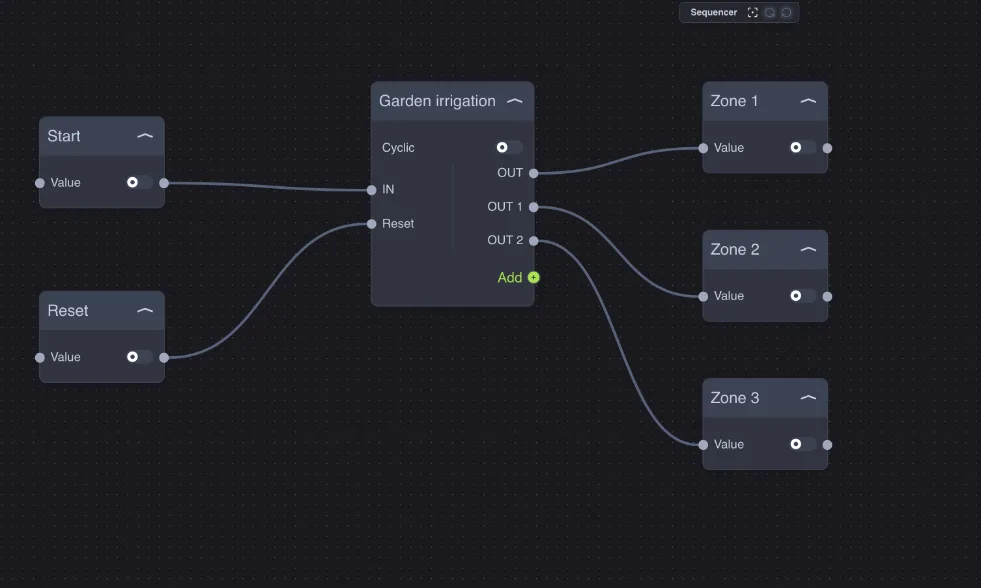
Example — zone irrigation: the Start button starts garden irrigation: zone 1 for 10 minutes (DELAY = 600), zone 2 for 15 minutes (900), zone 3 for 10 minutes (600). The zones are never open at the same time, so water pressure remains sufficient. Reset closes everything immediately, for example when the rain sensor detects water.
Other uses:
Cyclic on: a sign or decorative light that alternates multiple effects continuously;
staggered switching on of heavy loads (heat pumps, ovens) to avoid tripping the breaker;
zone air exchange with ventilation dampers.
To start the Sequencer at a scheduled time, connect an IF to the time output of the Date/Hour node.
Scenario (command sequence)
The Scenario node in the Sequences category (not to be confused with the plant Scenario component) sends a series of commands at regular intervals: on step 1 it sets OUT, after Interval seconds it sets OUT 1, then OUT 2, and so on.
Property / input | Meaning |
|---|---|
Trigger | Starts the sequence. If it is already running, the command is ignored. |
Stop | Pauses the sequence at the current step: the next Trigger resumes from there. |
Reset | Stops the sequence and returns it to the first step. It does not change the state of the outputs already sent. |
Interval | Seconds between one step and the next: from 1 to 60. |
OUT, OUT 1… | The value (on or off) sent by the step. Set it in the Properties window. |
TRG, TRG 1… | A pulse at the moment the step is executed: useful for controlling a component that requires a pulse, such as a scenario. |
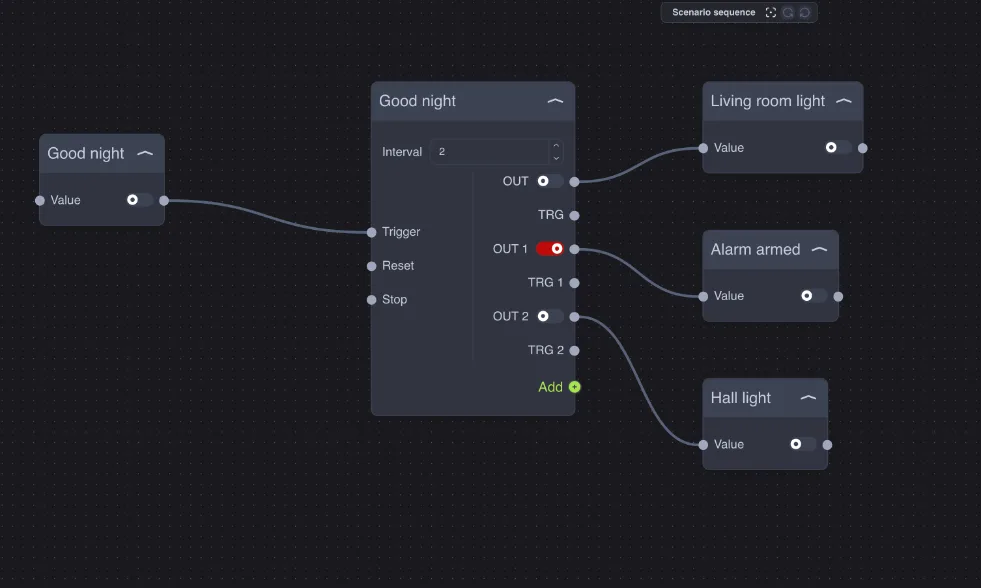
Unlike the Sequencer, the Scenario outputs do not turn off by themselves: each step sends its value and leaves it as is. It is the right tool for a series of different commands, not for switching on one thing at a time.
Example — good night: the Good night button turns off the living room light, after 2 seconds it sets the perimeter alarm, after another 2 seconds it turns off the entrance light. The interval avoids sending all the commands on the bus at the same time.
The Scenario starts when the Trigger input is on. If the command that starts it remains on, at the end of the sequence a new change can make it start again: for a clean start, use a pulse command or a Trigger ahead of it.