
Practical flow examples
Three complete Flow logic examples explained step by step: night courtesy light with motion sensor, hysteresis thermostat in Javascript, and open-door alarm with alarm counting.
Three complete logics that combine the nodes from the other guides. You can find them ready in the sample project with names starting with Example. To use them in your system, replace the Dummy nodes with your own components (Components and Dummy).
Night courtesy light
Objective: at night, motion in the garden switches on the light for two minutes; during the day, motion does nothing.
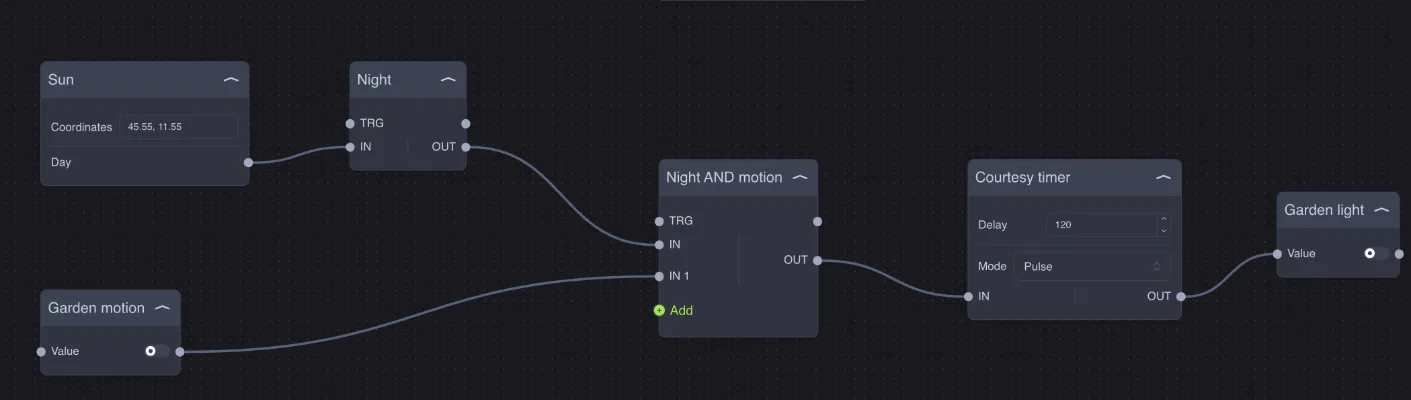
Node | Type | Configuration | Role |
|---|---|---|---|
Sun | Coordinates | On during the day. | |
Night | — | On at night. | |
Garden motion | Switch (sensor) | — | The motion sensor. |
Night AND motion | Two inputs | On only with motion at night. | |
Courtesy timer | Delay 120, Mode Pulse | Keeps the light on for 2 minutes after the last motion. | |
Garden light | Switch (light) | — | The garden light. |
How it works: during the day Night is off, so the AND stays off no matter what the sensor does. At night, any motion switches on the AND; the Stairs Light in Pulse mode turns on the light and restarts from 120 seconds with each new motion. When there is no more motion, the light switches off by itself.
Variants: add a third input to the AND with a Courtesy active variable to disable the function from the app; use a Range to turn on a dimmer at 30% instead of 100%.
Thermostat with hysteresis
Objective: control the heating valve with a hysteresis of ±0.5 °C around the setpoint, to prevent the valve from opening and closing continuously.
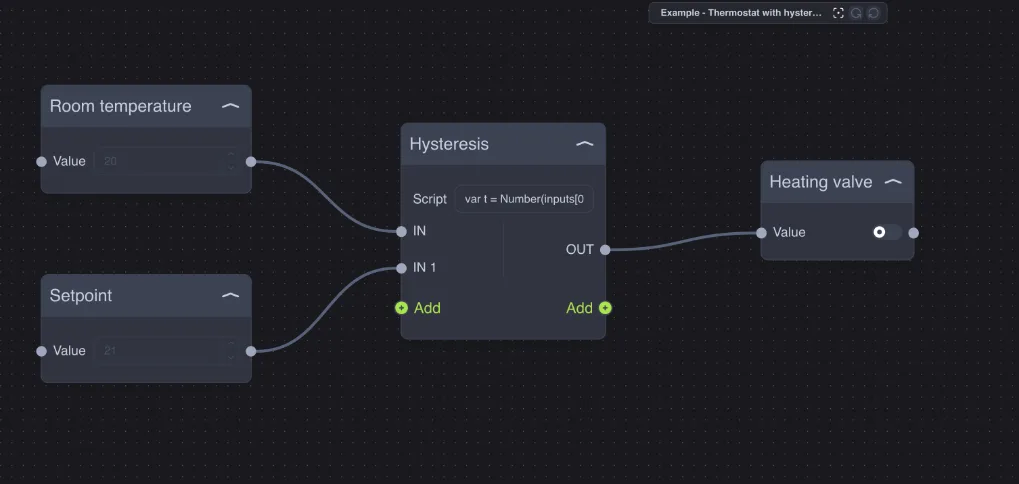
The Javascript Hysteresis node has two inputs (temperature on IN, setpoint on IN 1) and this script:
var t = Number(inputs[0]), sp = Number(inputs[1]);
if (t <= sp - 0.5) setOutput(0, true);
if (t >= sp + 0.5) setOutput(0, false);
How it works: with a setpoint of 21 °C, the valve opens when the temperature drops to 20.5 °C and closes when it rises to 21.5 °C. Between 20.5 and 21.5 the script does not call setOutput, so the valve stays as it was: this is the "memory" that creates the hysteresis. Changing the setpoint from the app updates the logic immediately.
Variants: change 0.5 to the range you want; add a Window open input and, if it is on, call setOutput(0, false) before anything else.
Open door alarm with count
Objective: if the front door remains open for more than one minute, an alarm is triggered; each alarm is counted.
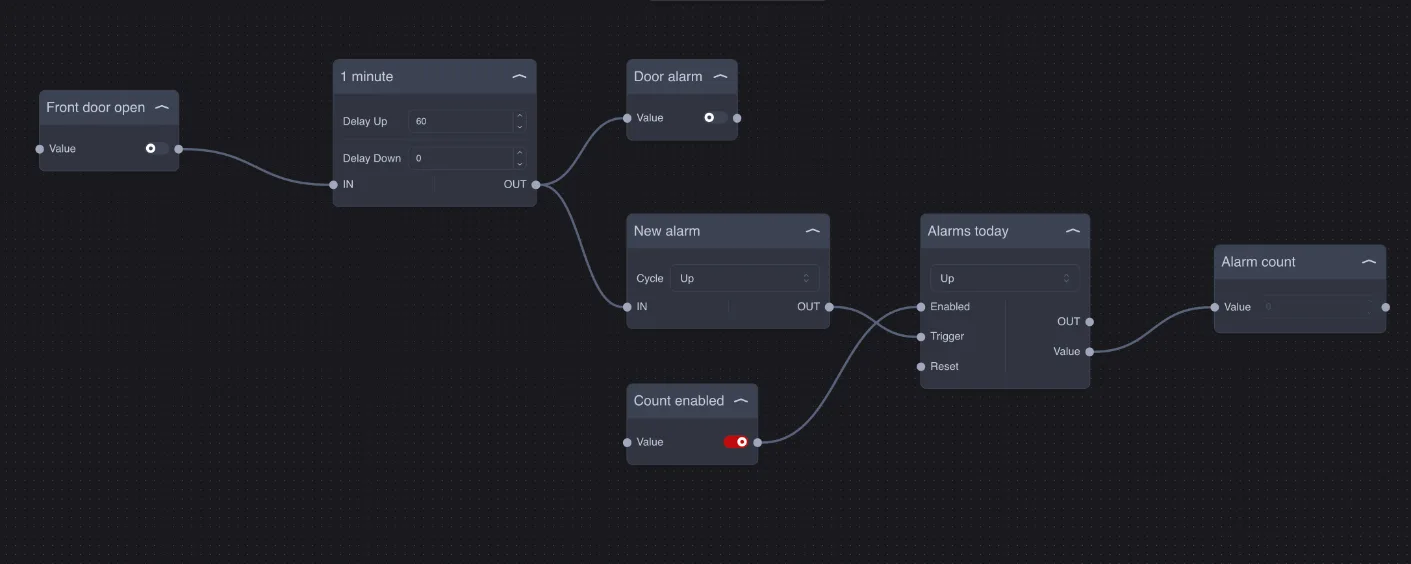
Node | Type | Configuration | Role |
|---|---|---|---|
Front door open | Switch (contact) | — | The door contact. |
1 minute | Delay Up 60, Delay Down 0 | Turns on only after 60 seconds with the door open; switches off immediately when closed. | |
Door alarm | Switch | — | The alarm (siren, notification, app indicator). |
New alarm | Cycle Up | One pulse for each new alarm. | |
Count enabled | Switch | On | Enables counting. |
Alarms today | Up, Preset 0 | Counts the alarms. | |
Alarm count | Number | — | The number of alarms, to display in the app. |
How it works: if the door closes again before one minute, the Timer cancels the delay and nothing happens. If it stays open, after 60 seconds the Timer output turns on the alarm and, through the Trigger, adds 1 to the counter. When the door closes, the alarm switches off immediately (Delay Down 0).
Variants: connect a pulse at midnight to the Counter Reset input (a Date/Hour node with an IF on the hour) to get true "today's alarms"; add a Repeat Command to the alarm to repeat the notification.