
Functions: IF, Math, Range, Filter, Javascript
The nodes in the Functions category of Flow: comparisons with IF, calculations with Math, scale conversions with Range, value filtering with Filter, and custom code with the Javascript node, with properties and examples.
The nodes in the Functions category work on values: they compare, calculate, convert, and filter. IF, Math, Range, and Filter have the TRG input, which works like in boolean operators: if it is connected, the node calculates only when TRG turns on.
IF: compare two values
Compares IN A with IN B and turns on the OUT output if the condition is true.
Condition | OUT on when |
|---|---|
Greater | A > B |
Less | A < B |
Greater or equal | A ≥ B |
Less or equal | A ≤ B |
Equal | A = B |
Not equal | A ≠ B |
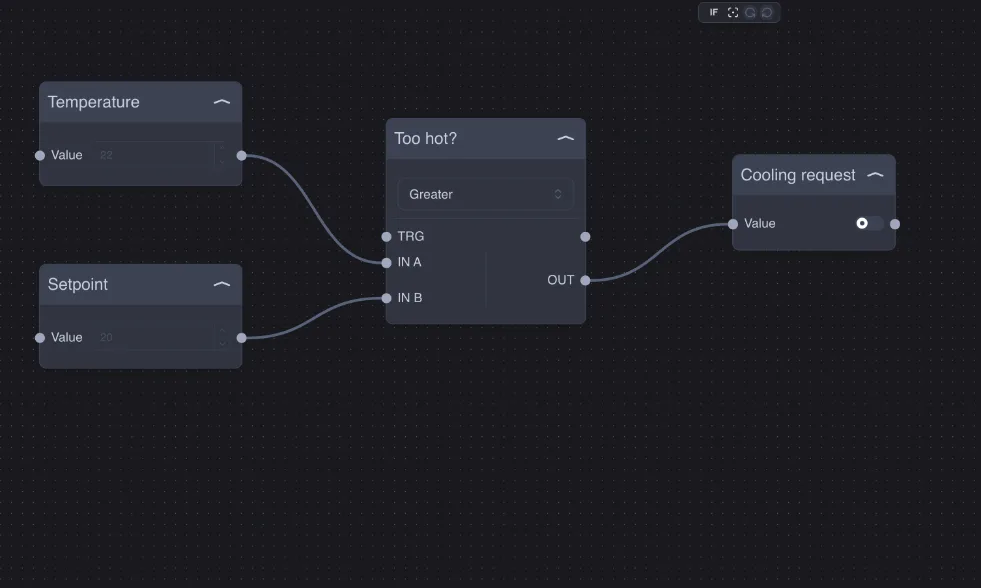
If both values are numbers (even if written as text, for example "21.5"), the comparison is numeric; otherwise IF compares the text exactly as written, including uppercase and lowercase. This way you can use Equal also to check a text value, for example the day of the week Sunday from the Date/Hour node.
Example — cooling request: room temperature on IN A, setpoint on IN B, condition Greater: the Cooling request output turns on when the room is warmer than the setpoint.
An IF between temperature and setpoint switches at every tenth of a degree around the value. For a real thermostat, hysteresis is needed: see the example in Practical examples.
Math: calculations on multiple values
Performs an operation on all IN inputs (with Add you can add more) and puts the result on OUT.
Operation | Result |
|---|---|
Max / Min | The highest / lowest value. |
Average | The average. |
Sum | The sum. |
Subtraction | The first input minus all the others. |
Multiplication | The product. |
Division | The first input divided by the others; division by zero gives an invalid result (NaN). |
Absolute | The absolute value of the most recently received value. |
Log10 | The base-10 logarithm of the most recently received value (only values greater than zero). |
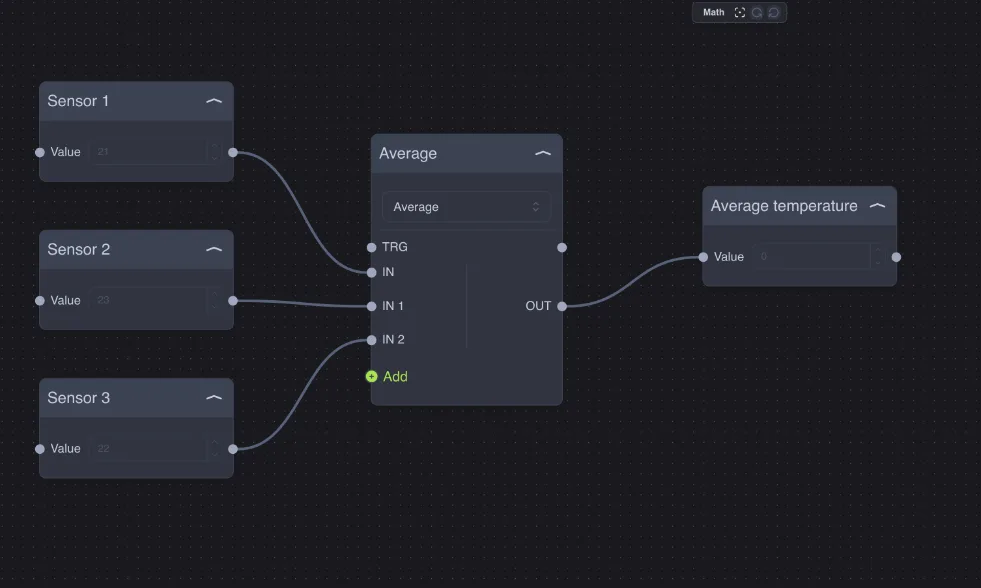
Inputs that have not yet received a value are ignored: an average of three sensors, with one sensor not yet connected, is the average of the other two.
Example — average temperature: three temperature probes on a Math Average; the output goes to an Info component for the app or to a thermostat as the reference temperature.
Other uses: Sum for total consumption of multiple lines, Max for the highest temperature among multiple rooms, Subtraction for the difference between supply and return, Multiplication to convert a unit (for example kWh × price).
Range: convert a scale
Linearly converts a value from one scale to another: the X0 input value becomes Y0 at the output, X1 becomes Y1, and intermediate values are proportional.
Property / input | Meaning |
|---|---|
X0, X1 | Start and end of the input scale. |
Y0, Y1 | Start and end of the output scale. |
IN | The value to convert. |
Priority Enabled | If on, the output takes the fixed Priority Value, regardless of the input. |
Priority Value | The forced value when priority is active (default 0). |
Direct/Inverse | If on, the node performs the conversion in reverse: from Y0–Y1 to X0–X1. |
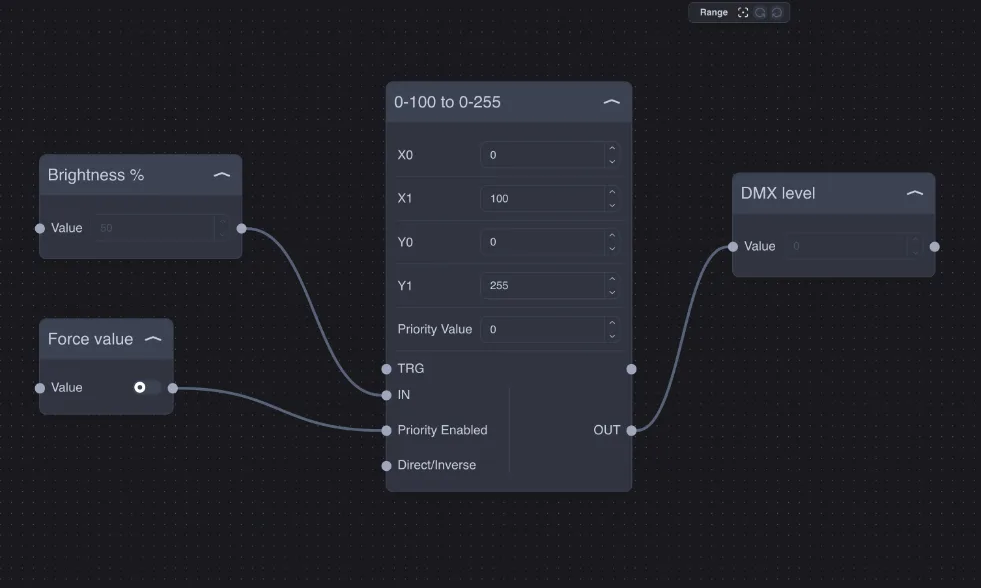
The node does not limit the result: a value outside the input range gives a value outside the output range (with X 0–100 and Y 0–255, an input of 110 gives 280.5).
Example — percentage to DMX: a 0–100 % slider controls a DMX 0–255 channel. With X0 = 0, X1 = 100, Y0 = 0, Y1 = 255, 50 % becomes 127.5. The Force value input connected to Priority Enabled forces the priority value (for example 0 to switch everything off).
Other uses: a 4–20 mA sensor read as 0–1000 to be converted to 0–50 °C; an inverted scale (Y0 = 100, Y1 = 0) to turn shutter opening into closing.
Filter: let only one value pass
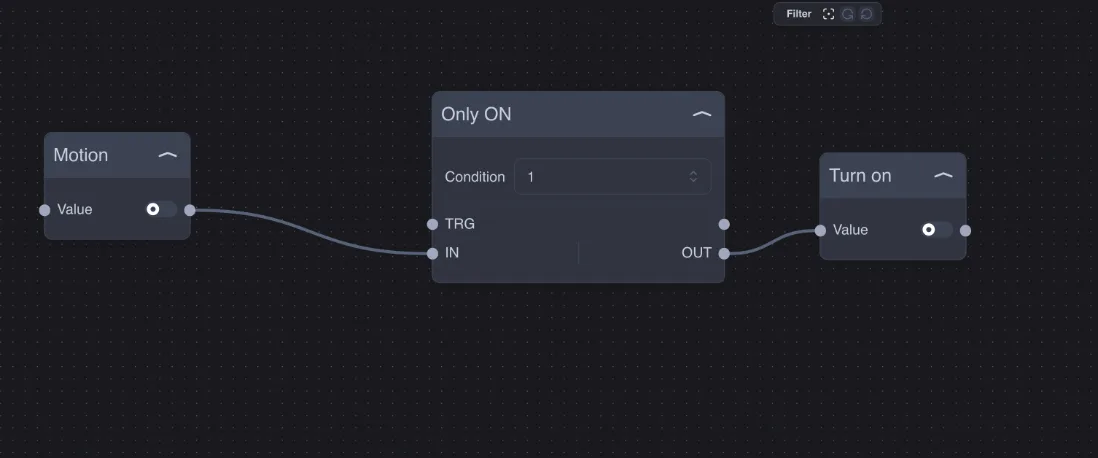
Lets only values equal to the Condition pass to OUT:
Condition = 1: only turn-ons pass; turn-offs are discarded.
Condition = 0: only turn-offs pass; turn-ons are discarded.
Example — turn-on only: a motion sensor turns on a light, but the switch-off must come from another logic block (for example a timer). With a Filter set to 1, the sensor can only turn it on.
Javascript: custom code
When the ready-made nodes are not enough, the Javascript node runs a script you write. It has one IN input and one OUT output; with the Add buttons you can add more inputs (IN 1, IN 2…) and more outputs (OUT 1, OUT 2…).
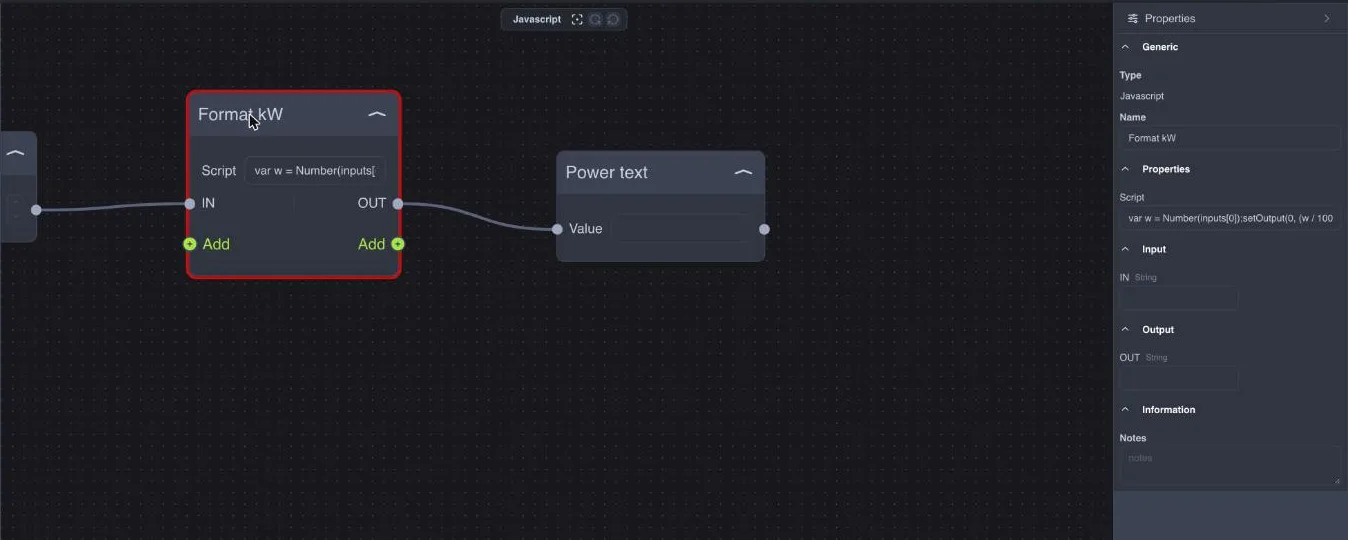
The script runs every time an input changes and has access to:
Name | Content |
|---|---|
| The list of current input values: |
| The number of the input that has just changed value (0 for IN, 1 for IN 1…). |
| The new value of that input. |
| Send a value on output number n (0 for OUT, 1 for OUT 1…). If the script does not call |
| Writes a message to the server log, useful for checking the script. |
Values arrive as text: use Number(inputs[0]) for numbers. Variables declared in the script remain in memory between executions of the same node, so you can remember a previous value.
Example — format a consumption value: from watts to text in kW with two decimals, for an Info component.
var w = Number(inputs[0]);
setOutput(0, (w / 1000).toFixed(2) + ' kW');
Example — report only large changes: send the temperature only when it changes by at least half a degree.
var t = Number(inputs[0]);
if (typeof last === 'undefined' || Math.abs(t - last) >= 0.5) {
  last = t;
  setOutput(0, t);
}
Example — two outputs from one input: from a power value, a boolean "overload" output and a numeric output in kW.
var w = Number(inputs[0]);
setOutput(0, w > 3000);
setOutput(1, w / 1000);
Each execution can last at most 250 ms and use at most 8 MB of memory; recursive functions are limited to 64 levels. A script that exceeds the limits is stopped and the error appears in the server log. Do not use waiting loops: for delays, use the timer nodes.