
Multimedia devices
How to integrate TVs, amplifiers, speakers, HDMI matrices and multiroom systems with the ILEVIA server using ilevia Manager.
The ILEVIA server also controls the home audio and video equipment: TVs, amplifiers, speakers, HDMI matrices and multiroom systems. From the ILEVIA Control app, you can turn them on, change source and volume, and the same commands can be used in scenes (for example Cinema: dimmed lights, shutters down, TV and amplifier on).
All integrations are found in the Multimedia category of the Components Library in ilevia Manager.
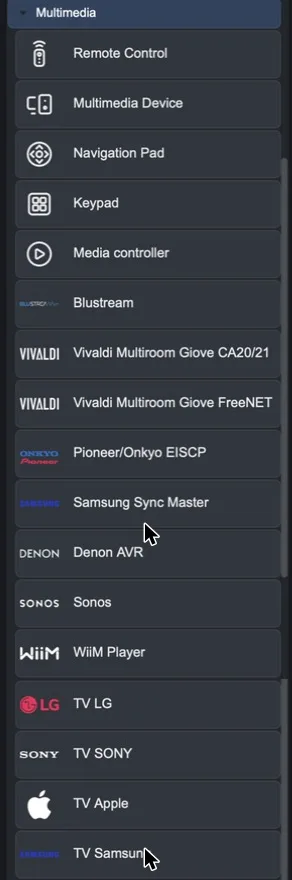
Available integrations
Device | Component | How to configure it |
|---|---|---|
LG TVs, SONY TVs, Samsung TVs, Apple TVs | Guided procedure with IP; the server creates the components (connection required). | |
Sonos | Widget in the app; commands from KNX with KNX Commands Wizard. | |
WiiM Player | Player IP; widget in the app and commands from KNX with KNX Commands Wizard. | |
Denon AVR, Pioneer/Onkyo EISCP | Guided procedure with IP; components for zones, sources, tuner and menu. | |
Blustream | IP and port; one input selector for each output. | |
Samsung Sync Master | Guided procedure with IP and port 1515. | |
Vivaldi Giove CA20/21, Giove FreeNET | Guided procedure; one command group for each zone. | |
Any other device | Remote Control, Multimedia Device, Navigation Pad, Keypad | Virtual remote control: each button is a scene (infrared, KNX, HTTP…). |
General recommendations
Assign each device a fixed IP address or a DHCP reservation in the router: the integrations use it to reach it.
Enable network control on the device even in standby, otherwise it will not be possible to turn it on from the app.
Many integrations use the server logic: install the Logic module.
After creating the components, add them to the user interface and upload the project with Project > Upload to server.