
Signal Component
The Signal component processes a single signal by adding validation and delay times before activating an output; parameters in Ilevia Manager.
Introduction
The Signal component is an operator that lets you process a single signal to add a delay or activate functions after checking the signal stability for a certain period of time.
Use cases
The user can turn on a light when a motion sensor is triggered.
Component properties
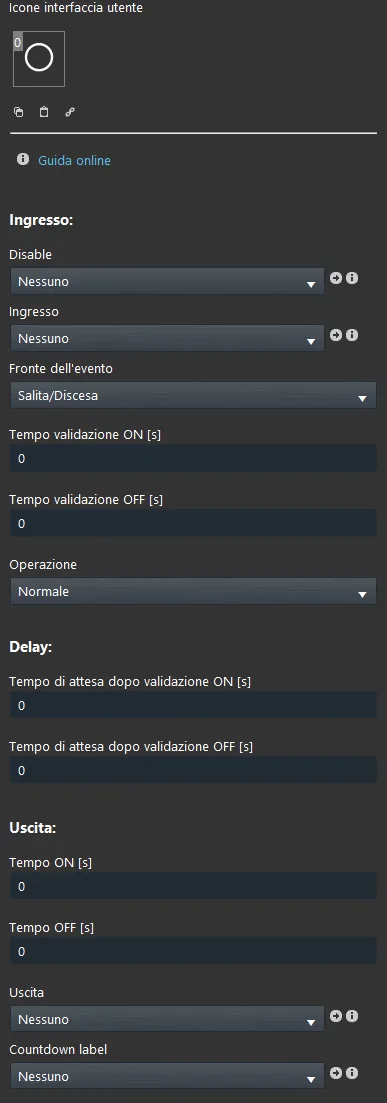
GUI
This component was created using the Graphic UI gateway.
You can refer to the chapter “Gateway / protocols” for further information.
Input
Input: select the Switch component to use as input.
Event edge: select whether the event is rising, falling, or both.
ON validation time (seconds): enter the time that must elapse for the ON value of the input component to be considered valid.
OFF validation time (seconds): enter the time that must elapse for the OFF value of the input component to be considered valid.
Operation: select whether the operation must be performed normally or inversely.
Delay time
Delay after ON validation (seconds): enter the time that must elapse after the ON value of the input component has been validated.
Delay after OFF validation (seconds): enter the time that must elapse after the OFF value of the input component has been validated.
Output
Output: select the Switch component to use as output.
ON time (seconds): enter how long the output component must keep the ON value.
OFF time (seconds): enter how long the output component must keep the OFF value.
Countdown label: link an Info component that will display the remaining time, based on the time parameters set above.
Reminder before continuing
Download and install the Ilevia Logic plugin to enable plugins (link);
After uploading the project to the Ilevia server, wait a couple of minutes for the logic to start.
For the step-by-step guide to the sample project, see the Signal sample project page.