
Intesis
How to configure the Intesis component in Ilevia Manager to control air conditioners via IntesisBox Wi-Fi Gateway.
INTRODUCTION
The Intesis component lets you control and monitor the system for various types of air conditioners through the IP protocol.
USE CASES
The user wants to control heating and air conditioning devices through Intesis devices;
The user wants to control the home air conditioner from the Ilevia Control app.
Automatic group creation
As always, drag the required components from the "Components" section. The special feature of this component is the creation of an Intesis group in which all the required components are added automatically. In addition, the Intesis properties are already configured to speed up gateway creation.
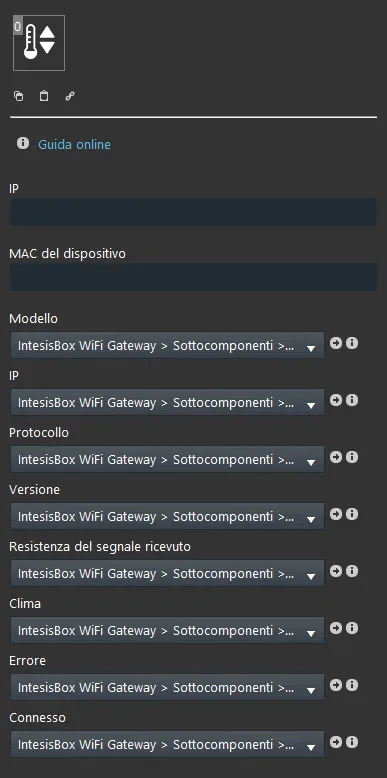
COMPONENT PROPERTIES
GUI
This component was created using the Graphic UI gateway.
You can refer to the chapter "Gateway / protocols" for further information.
IP: enter the IP address of the IntesisBox Wi-Fi Gateway;
Device MAC: enter the device MAC address;
SUB COMPONENTS
The other parameters are populated automatically with data read directly from the IntesisBox Wi-Fi Gateway.
Model: Info component that shows the model of the connected device;
IP: Info component that shows the IP address of the connected device;
Protocol: Info component that shows the protocol in use;
Version: Info component that shows the current protocol version;
Signal reception strength: Info component that shows the current signal strength;
Climate: this Climate component controls the thermostat connected to the IntesisBox Gateway;
Error: Info component that shows the error reported by the gateway;
Connected: this Switch connects the system to the gateway when it is on and disconnects it when it is off;
RESULT IN THE INTERFACE
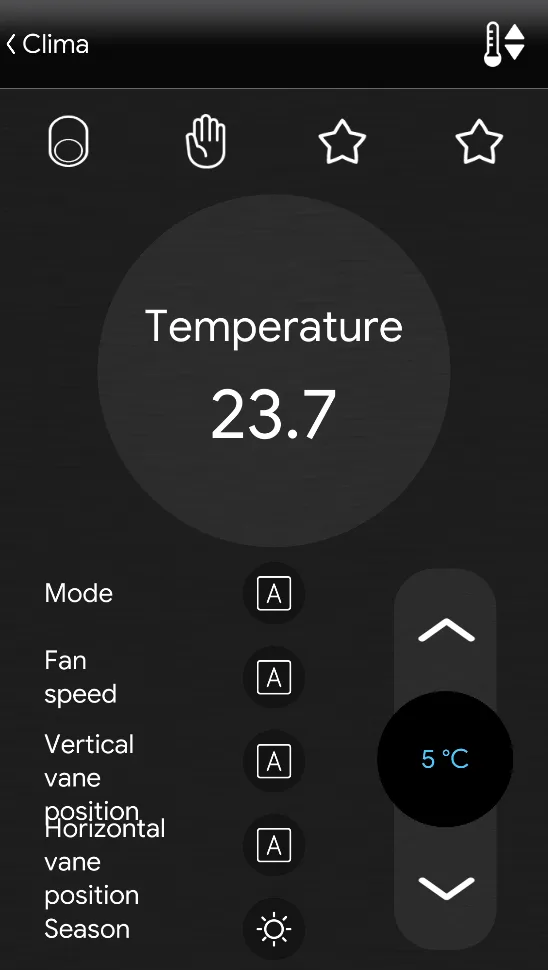
Once the Intesis component is configured, to control the device from the Ilevia Control app you need to insert the preconfigured Climate component into the user interface, which you can find in the sub-components section.
The result you will find in the Ilevia Control app interface will be this:
Other IntesisBox Wi-Fi Gateways compatible with our system are the following:
– Daikin: residential units, VRV and Sky systems
– Fujitsu: RAC and VRF systems
– Units with IR receiver
– LG: residential units and VRV
– Mitsubishi Electric: AC units
– Mitsubishi Heavy Industries: FD and KX6 systems
– Panasonic: Etherea units and ECOi and PACi systems
– Toshiba: VRF and Digital systems
For more information about the IntesisBox Wi-Fi Gateway, see this link.
Reminder before continuing:
Download and install the Ilevia Logic plugin to enable plugins (link);
After uploading the .eve project to the server, wait a couple of minutes for the logic to activate.