
Decimal-to-hexadecimal conversion script for the KNX bus
Guide on how the script converts a decimal value entered by the user into hexadecimal and then sends it to the KNX bus.
Introduction
This guide explains how to create a script that converts a set of decimal values into hexadecimal and then triggers a Scenario component that sends the value on the KNX bus.
Script overview
Step 1:
Create the new variable that contains the hexadecimal value that will be added to the value sent on the KNX bus.

Step 2:
Create the new function “scorporate_dec” and inside it the variable “pin”: this variable takes the value from the Text input component.

Step 3:
Create three new variables: they split the value in the Info component into three separate parts.
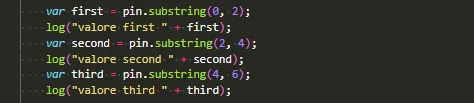
Step 4:
The values stored in the variables are converted to hexadecimal; the function adds the character 0 if the number of characters is less than 2.
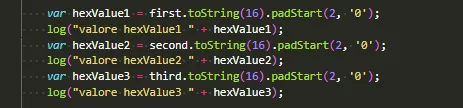
Step 5:
Three new variables are created: in this part of the script they take the hexadecimal value and the prefix “0x” is added to the value.
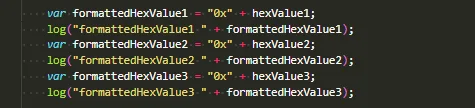
Step 6:
The new variable “tot” is created, which groups all processed variables. The value is then written to the Info component with ID 13; finally, the Scenario component is executed, sending the result on the KNX bus.

Download the example project to test it.