
MQTT Gateway Properties
MQTT gateway and MQTT 2 gateway properties in Ilevia Manager and component settings for communicating with IoT devices.
Introduction
This protocol allows interaction with IoT devices through a set of messages exchanged on dedicated channels called topics. Topics pass through a network service called a broker, which makes message exchange between clients and the IoT device possible.
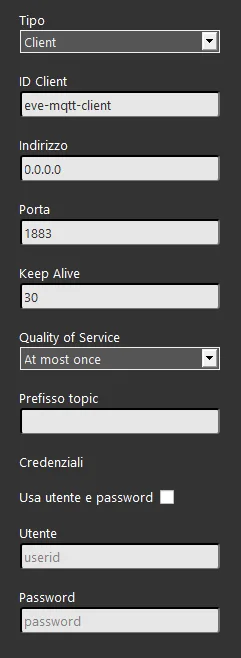
Gateway Properties
Type: this option list lets you choose between Client and Bridge the type of function that the X1 server will have.
Bridge mode allows you to connect multiple brokers; Client mode, set by default, configures the connection to the broker as a client.
Client ID: here you can enter the MQTT client ID used to register your client with the broker; the default client ID is eve-mqtt-client when using the X1 server broker.
Address: here you can enter the broker IP address to be set for the X1 server. Localhost is the address accepted by the X1 server to use its own broker.
Port: here you can set the port assigned to the MQTT protocol; the default port is 1883.
Keep alive: here you can set the keep alive time in seconds.
Quality of Service: this option list lets you choose the QoS level of the connection between client and broker.
Topic prefix: this text field lets you set a prefixed topic that the X1 server uses as the standard topic when sending messages.
Use username and password: this checkbox enables or disables the use of credentials for the connection to the broker.
Username: here you can enter the username for the connection to the broker.
Password: here you can enter the password for the connection to the broker.
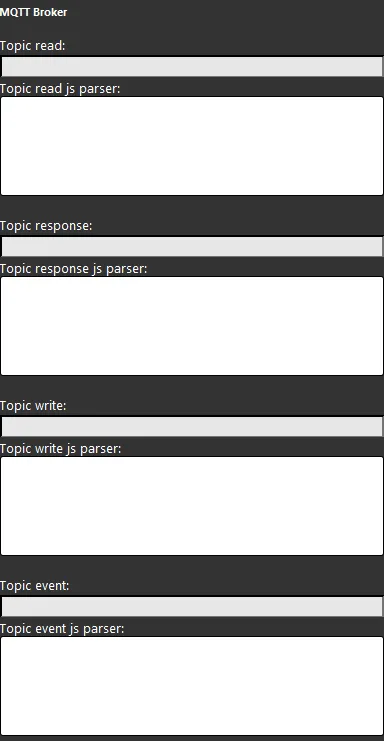
Component Properties
Topic: in this text field you can enter the topics of the messages that will be sent to the IoT device. For more information on how topics and payload work in the Ilevia system, click this link.
JS parser: here you can enter your JavaScript code to send commands and receive states from the IoT device.
MQTT 2 Gateway
Unlike the MQTT gateway described above, MQTT 2 gateway is managed entirely by the Logic module within the server.
Certificate conversion
The CRT and KEY certificates, required for authentication on some MQTT servers, must be converted before being entered into the MQTT gateway configuration in Ilevia Manager. The conversion changes the certificate from the PKCS1 format to the PKCS8 format.
Download the certificate conversion software.