
BACnet Client/Server Gateway
Configure BACnet Client and Server on X1 Plus: network, scan, Group component and BMS connections.
Introduction
BACnet enables data exchange between building automation systems, for example HVAC controllers and BMS supervisory systems. This guide describes the BACnet/IP configuration with X1 Plus and the fields visible in the Manager.
BACnet Client or BACnet Server?
Protocol | Role of X1 Plus | Example |
|---|---|---|
BACnet Client | Reads or commands the points made available by external BACnet devices. | Acquire a temperature from an HVAC controller. |
BACnet Server | Makes the Ilevia components connected to the Server configuration available to an external BACnet system. | Expose a value managed by Ilevia to the BMS. |
Client and Server are two separate entries in the Protocol selector. To use them in the same project, create separate gateways and make sure endpoints and ports are configured without conflicts.
What you need
X1 Plus and the devices or BMS reachable on the BACnet/IP network.
The network configuration defined by the integrator: local interface, port and communication path.
The list of points to exchange: device, object type and identifier, property, unit and read/write capability.
For a BACnet point, the IP address identifies the host on the network; the object type and identifier identify the point within the device. These are different data.
Configuration in Ilevia Manager
Open Gateways and create a gateway with a recognizable name, for example BACnet Client HVAC or BACnet Server BMS.
In Protocol, choose BACnet Client or BACnet Server according to the required role.
Leave Enabled active and complete the specific configuration described below.
For creation and removal commands, see Add and remove a gateway.
BACnet Client: network and communication
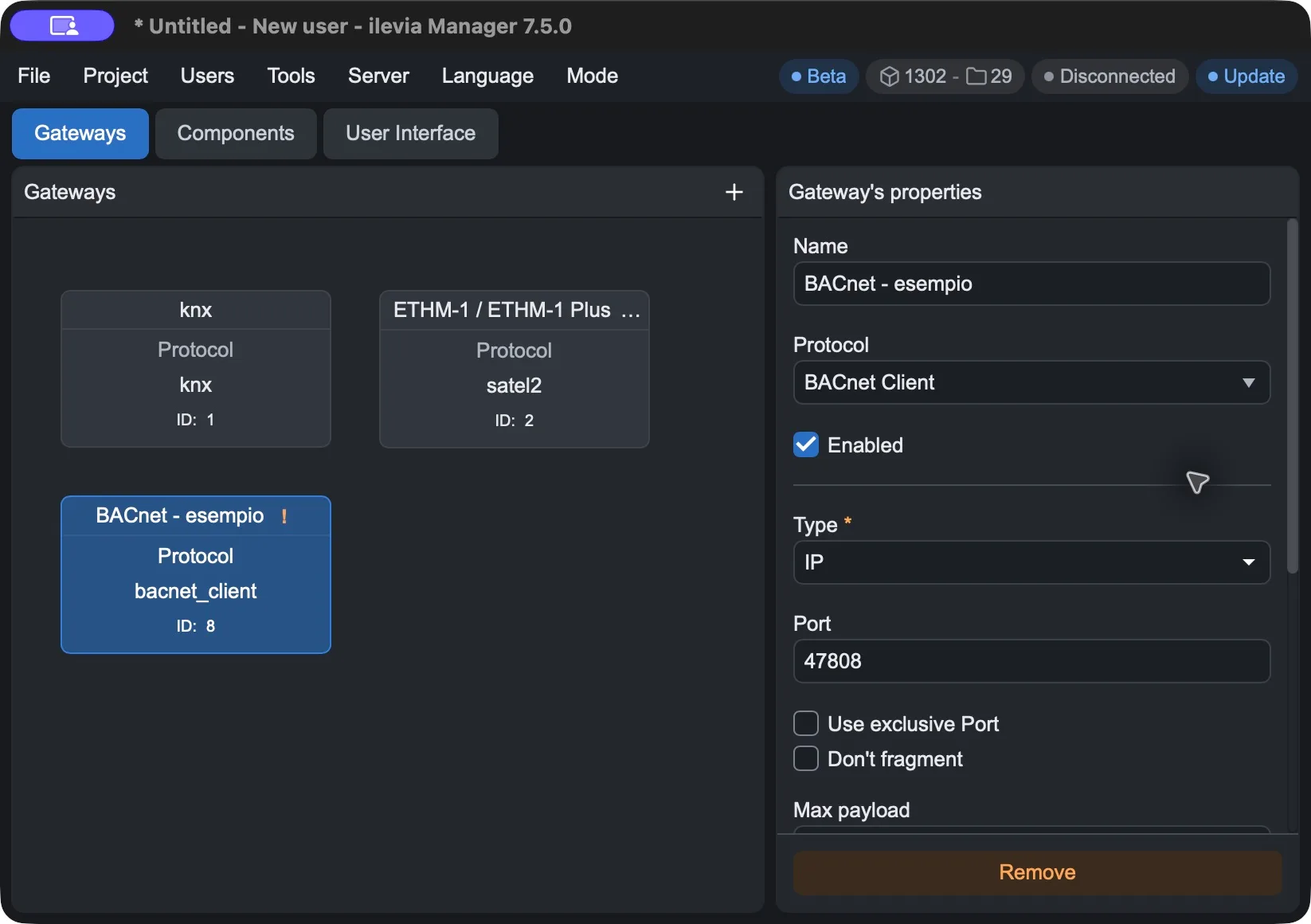
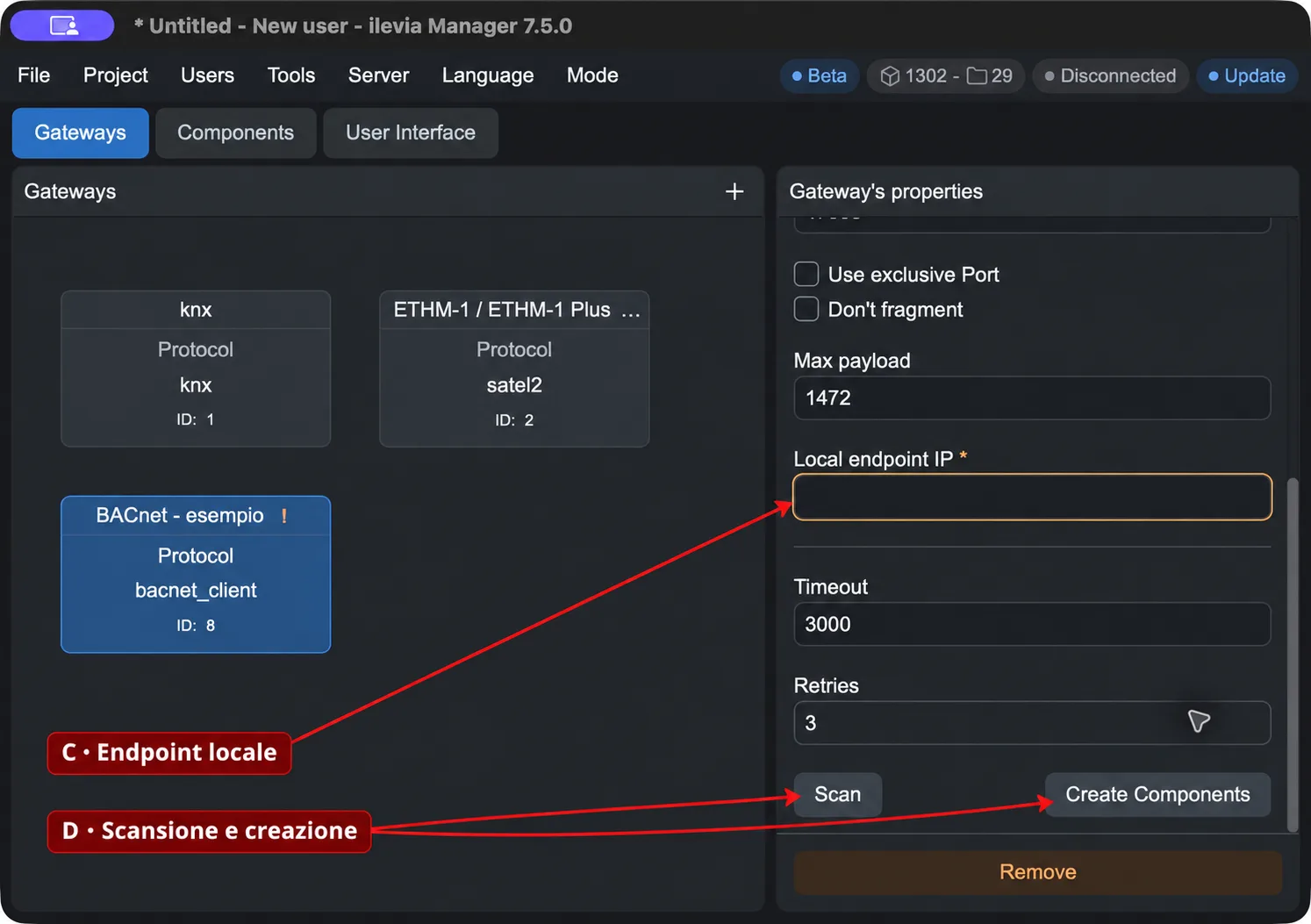
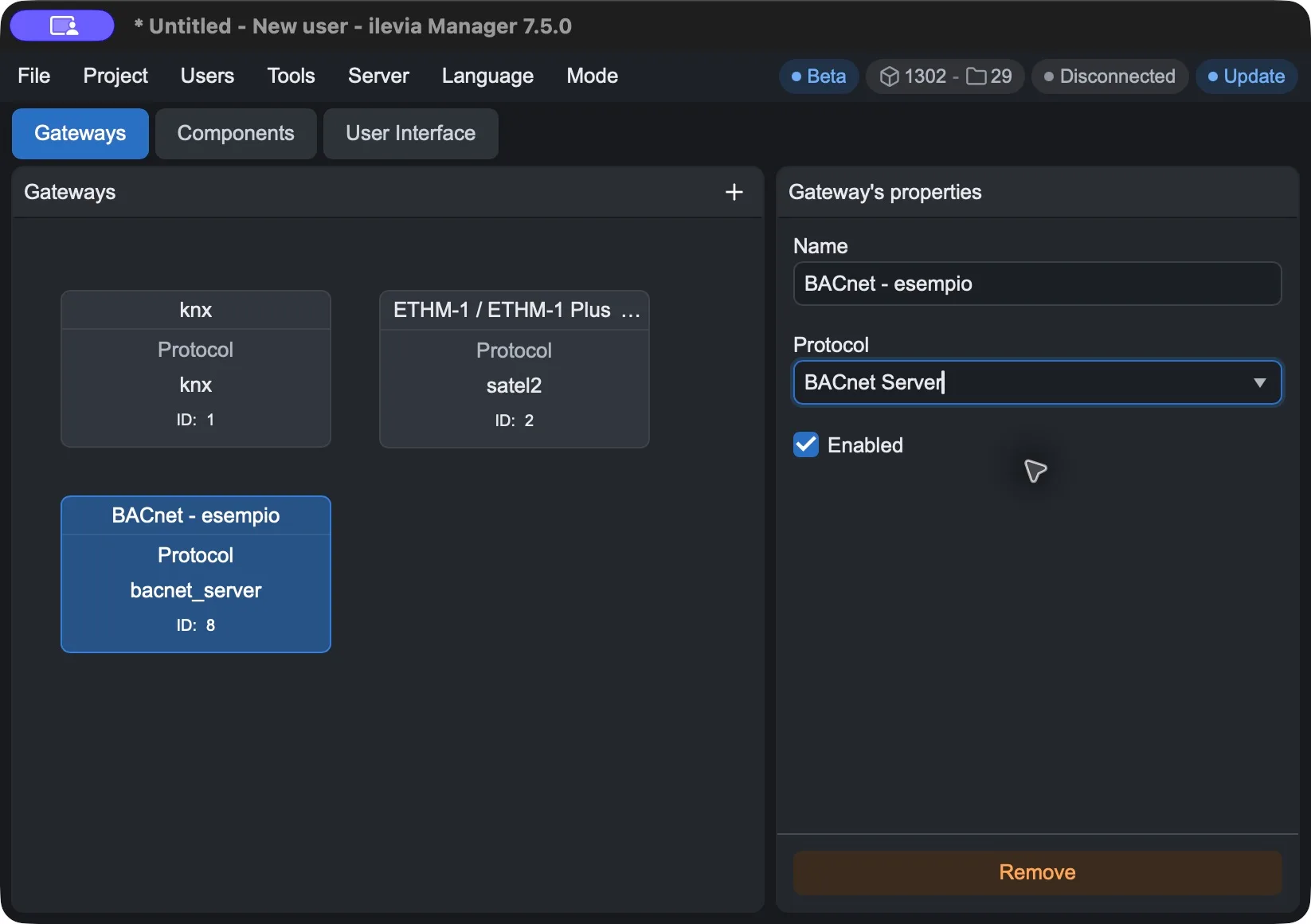
The first two images show the Client parameters, before and after scrolling the panel. The third shows the Server gateway. Click the images to enlarge them.
Client field | Meaning / initial value |
|---|---|
Type | For BACnet/IP, select IP. |
Port | BACnet/IP communication port. The Manager proposes 47808. |
C · Local endpoint IP | IP address of the local interface used by BACnet communication. The field is mandatory and initially empty. It is not the IP address of the remote device. |
Timeout | Maximum wait time for the response, in milliseconds. Initial value: 3000 ms. |
Retries | Number of retry attempts for failed requests. Initial value: 3. |
Local endpoint IP must be chosen according to the host running the communication and its network card. When working from the Manager and when the project is running on X1 Plus, check the operating context before using the same value: a local address of the computer does not automatically identify an interface on X1 Plus.
Advanced Client options
Option | Technical meaning |
|---|---|
Use exclusive Port | Requires exclusive use of the port by the transport. Check for any other BACnet services on the same port. |
Don't fragment | Sets the IP transport behavior to prevent packet fragmentation. |
Max payload | Maximum payload size, expressed in bytes. The Manager proposes 1472. It must be consistent with the network and the devices involved. |
The descriptions of the advanced options follow the technical meaning of the fields. Their effect on the system must be verified during communication commissioning.
Client component scan and creation
D · The Client gateway provides the Scan and Create Components buttons. Scan is the device search command; Create Components starts creating components based on the data available in the configuration.
Configure Type, Port and Local endpoint IP for the network from which communication will be performed.
Use Scan in the configuration intended for the system and check the detected devices and points.
Before using Create Components, verify that the data refers to the devices to be integrated.
Check the created components and compare objects, properties and values with the point list supplied by the integrator.
The availability of the button does not confirm that the network is reachable. If the scan does not find any devices, check the local endpoint, port and network path before creating the components.
BACnet Server: gateway and Group component
In the BACnet Server gateway, the Manager shows Name, Protocol and Enabled. The port and connections are configured instead in the Group component of the Logic operations library, identified in the properties as components_group.
Create and enable the gateway with Protocol = BACnet Server.
Open Components → Logic operations and add Group from the library.
Select the component and in the Gateway field associate the BACnet Server gateway.
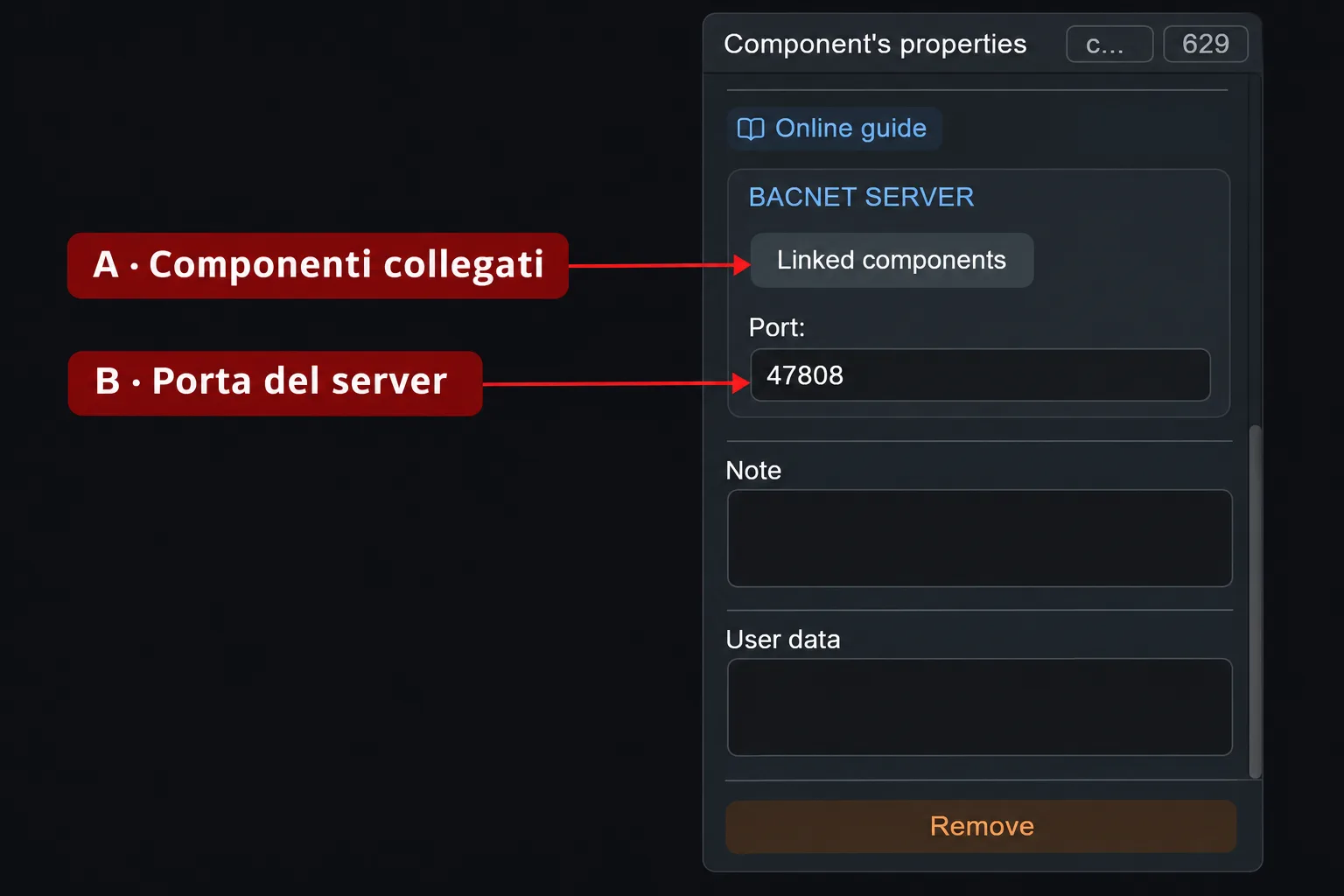
Scroll to the BACNET SERVER section: here Linked components and Port appear.
Group component field | Use |
|---|---|
A · Linked components | Dedicated command for linking the components to be made available through BACnet Server. Define and check the links required by the project. |
B · Port | BACnet Server port. The initial value shown in the component is 47808. It must match the one used by the external system to communicate with X1 Plus. |
Use the Group in the Logic operations category (components_group). The Add group command in the My components bar creates an organizational project group and does not show this BACNET SERVER section.
After connecting, check from the BMS which points are available and whether they allow the intended read or write operation. Also complete the links in the Group component to define the points to expose.
Apply the changes and test
Save the project with File → Save.
Upload the project to X1 Plus with Project → Upload. Repeat the upload whenever you want to apply new changes to the server.
For the Client, compare at least one read value with the device value; only test writing on points intended to be writable.
For the Server, check the connected components from the BMS and verify value updates.
Tips and checks
Issue | Checks |
|---|---|
No device detected by the Client | Type, Local endpoint IP, port, network interface, and device reachability. |
Timeout or intermittent responses | Network path, Timeout, Retries, and compatibility of advanced parameters. |
The BMS does not see the Ilevia points | Gateway Server enabled, associated components_group component, Linked components, port, and BMS connection to X1 Plus. |
A point does not update or does not accept commands | Object type/identifier, property, read/write permissions, and correspondence with the list of points. |
X1 Plus and the devices must be on the same BACnet/IP network, or on networks configured to support the required communication, including device discovery. Reachability of an IP alone does not guarantee BACnet discovery availability.
You can connect BACnet values to the other functions of the Ilevia project, including KNX and Modbus integrations. For the list of protocols, see Gateway and supported protocols.