
Vivaldi Multiroom Giove CA
How to configure Vivaldi Multiroom Giove (CA20/21 and Free) components in Ilevia Manager and control them from Ilevia Control.
Introduction
These components let you interact with and control devices from the Vivaldi Group.
Use cases
The user wants to interact with their Giove Multiroom devices through the Ilevia Control application, being able to manage everything from track changes to power on/off, all the way to customizing sound effects.
Giove CA20/21: automatic group creation
As always, you need to drag the required components into the “Components” section. The special feature of this component is the automatic creation of Vivaldi Multiroom Giove CA20/21 groups, where all the components needed for its configuration are added automatically.
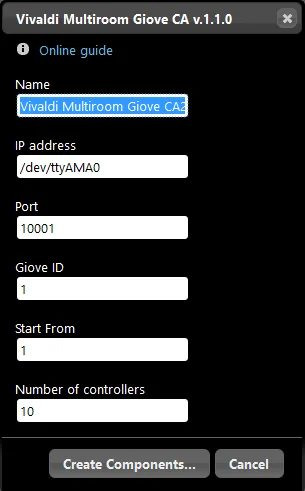
Component properties
VIVALDI
This component was created using the Vivaldi Group Giove CA20/21 gateway.
Refer to the “Gateway / protocols” chapter for more information.
Name: customizable text field where the group name is entered;
IP Address: By default, Ilevia Manager shows the serial address of Giove CA20/21 devices; if the device is connected via ethernet cable, enter the IP address;
Port: This field should only be changed if the Giove CA20/21 device is connected via ethernet cable;
Giove ID: Unique ID identifying the device;
Start from: Starting number of the first device entered;
Number of devices: Number of devices to enter.
Reminder before continuing:
Download and install the Ilevia Logic plugin to enable plugins (link);
After uploading the project to the Ilevia server, wait a couple of minutes for the logic to start.
Giove Free: automatic group creation
As always, you need to drag the required components into the “Components” section. The special feature of this component is the automatic creation of Vivaldi Multiroom Giove Free groups, where all the components needed for its configuration are added automatically.
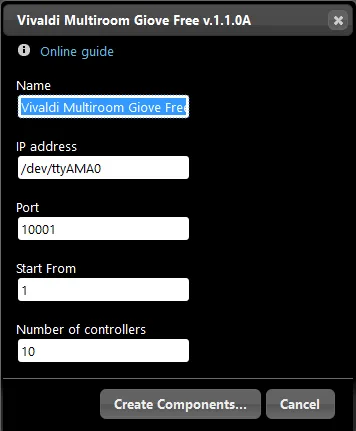
Component properties
VIVALDI GIOVE FREE
This component was created using the Vivaldi Group Giove Free gateway.
Refer to the “Gateway / protocols” chapter for more information.
Name: customizable text field where the group name is entered;
IP Address: This is the serial address and must not be changed;
Start from: Starting number of the first device entered;
Number of devices: Number of devices to enter.
Reminder before continuing:
Download and install the Ilevia Logic plugin to enable plugins (link);
After uploading the project to the Ilevia server, wait a couple of minutes for the logic to start.