
Relative Value
How to set up the Relative Value component in Ilevia Manager to count a component over annual, monthly, weekly, daily, or custom intervals.
INTRODUCTION
The component allows you to count a specific component for a period selected by the administrator in Ilevia Manager. Each time the interval expires, the count is reset automatically.
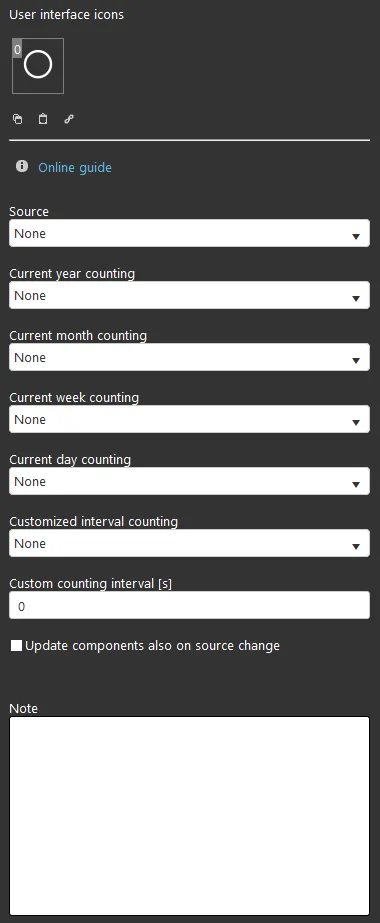
COMPONENT PROPERTIES
GUI
This component was created using the Graphic UI gateway.
You can refer to the chapter "Gateway / protocols" for more information.
Source: select the component whose data you want to log;
Current annual count: select the Info component where the annual count will be logged;
Current monthly count: select the Info component where the monthly count will be logged;
Current weekly count: select the Info component where the weekly count will be logged;
Current daily count: select the Info component where the daily count will be logged;
Custom count interval: select the Info component where the count will be logged at the custom interval;
Custom count interval [s]: text field where you enter a custom interval, in seconds;
Update component when source changes (checkbox): if selected, the Info component is updated every time the source component changes;
Note: text field available for additional information about the component, visible on the administrator side.
Important. It is not necessary to fill in all fields.
Reminder before you continue:
Download and install the Ilevia Logic plugin to enable plugins (link);
After uploading the project to the Ilevia server, wait a couple of minutes for the logics to start.