
Entrade
How to integrate Entrade solar inverters into the Ilevia system with the Ilevia Manager Entrade component and which energy values it displays.
INTRODUCTION
Entrade offers a wide range of devices for energy production and management. The Ilevia server can integrate the entire line of Entrade solar inverters with a single component, easy to configure, in the Ilevia Manager configuration software.
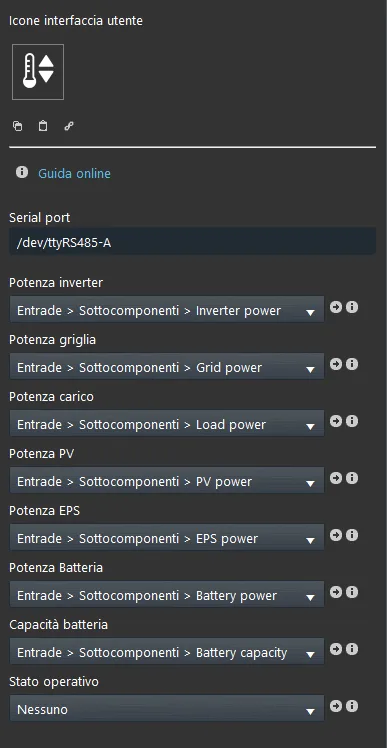
Component properties
Serial port: Sets which serial port the Entrade device is connected to. You can choose between /dev/ttyRS485-A (left connector on the X1 server) and /dev/ttyRS485-B (center connector on the X1 server).
Inverter power: This Info component shows the instantaneous power produced by the solar panels.
Grid power: This Info component shows the surplus power from the photovoltaic system exchanged with the grid.
Load power: This Info component shows the load value coming from the Entrade inverter.
Pv power: This Info component shows the electrical power produced by the solar panels.
EPS power: This Info component shows the power value of the EPS system (Emergency Power Supply, backup power supply).
Battery power: This Info component shows the power of the batteries connected to the solar system.
Battery capacity: This Info component shows the battery capacity of the solar system.