
Blustream
How to configure the Blustream component in Ilevia Manager to control a Blustream matrix device: IP, port, outputs, power on and beep.
Introduction
This component lets you control Blustream matrix devices.
Use cases
The user wants to control one of their Blustream devices through Ilevia Control; all functions can be configured in the component.
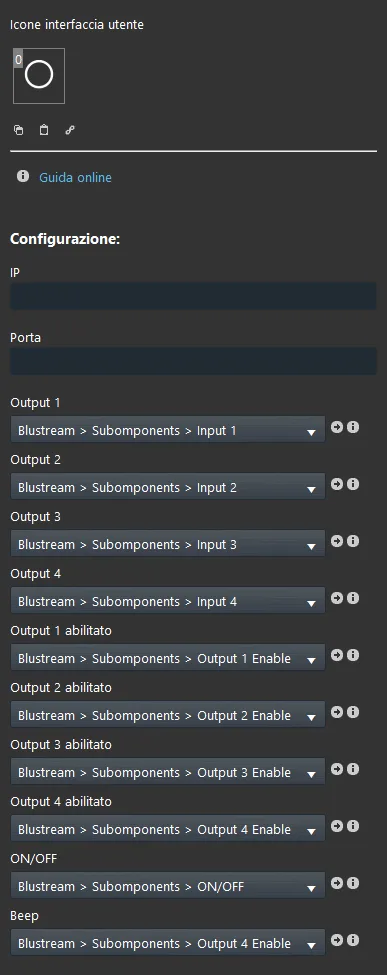
Component properties
The component title and icon can be customized. See the “Common Properties” guide.
Configuration
IP: the IP address of the Blustream device;
Port: the port number of the Blustream device;
Output 1: the user can set the desired input for output 1; it is also possible to configure the related values and descriptions;
Output 2: the user can set the desired input for output 2; it is also possible to configure the related values and descriptions;
Output 3: the user can set the desired input for output 3; it is also possible to configure the related values and descriptions;
Output 4: the user can set the desired input for output 4; it is also possible to configure the related values and descriptions;
Output 1 Enabled: this option lets the user enable or disable output 1 of the Blustream device; this option list uses a switch component;
Output 2 Enabled: this option lets the user enable or disable output 2 of the Blustream device; this option list uses a switch component;
Output 3 Enabled: this option lets the user enable or disable output 3 of the Blustream device; this option list uses a switch component;
Output 4 Enabled: this option lets the user enable or disable output 4 of the Blustream device; this option list uses a switch component;
ON/OFF: to turn the Blustream Matrix device on / off;
Beep: enables or disables the sound.