
EL.MO intrusion integration
How to use the EL.MO Intrusion component in Ilevia Manager to control and monitor EL.MO intrusion control panels: parameters, components, and compatible models.
Introduction
This component allows you to control and monitor certain EL.MO intrusion control panels.
Use cases
The user wants to control the intrusion system through the Ilevia Control user interface.
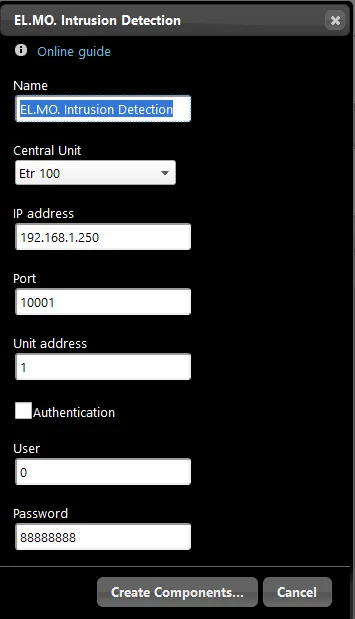
Component properties
ELMO
This type of component was created using the EL.MO. Intrusion gateway with EL.MO spa protocol.
See the “Gateway / Protocols” chapter for more information.
Name: editable text field where you enter the group name;
Control panel: select the control panel model;
IP address: enter the device IP address;
Port: enter the communication port;
Unit address: set the unit number;
Authentication: if selected, authentication is required;
User: enter the admin user;
Password: enter the admin password.
Automatic group creation
As with the other components, drag the component from the “Components” section into the project. The special feature of this component is the automatic creation of an “EL.MO Intrusion” group, which already includes all the components needed for configuration. Other components can be added to improve system control, for example by placing all window sensors in a List so their status can be checked before arming the alarm.
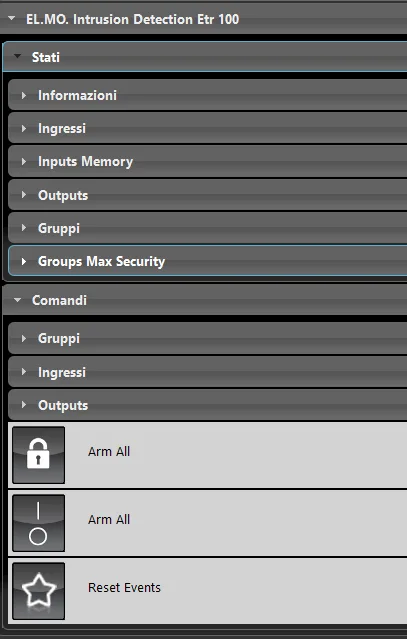
States
Information: component that provides information about the alarm system, such as connection status, versions, authentication status, etc.;
Inputs: component that shows the status of input devices;
Inputs Memory: component that shows which device triggered the alarm; it resets when the alarm is disarmed;
Outputs: components that show the status of output devices;
Groups: component that shows the status of a given area;
Groups Max Security: components that show the status of the maximum-security zones.
Commands
Groups: components to arm and disarm the alarm in the various zones;
Inputs: components to enable and disable input devices;
Outputs: components to enable and disable output devices;
Arm All: component to arm and disarm the entire alarm system; requires the password;
Arm All: component to arm and disarm the entire alarm system;
Reset Events (Scenario): component that resets events in the alarm system.
EL.MO devices compatible with the Ilevia server
Etr 100 line
Etr 128 line
Etr 256 line
Etr 512 line
Etr 48 line
Net 832 line
Net 9 line
Etr 100 G2 line
Etr 128 G2 line
Etr 256 G2 line
Etr 512 G2 line
Villeggio Genio Basic line
Villeggio Genio Domo line
Villeggio Genio Smart line
Pregio 1000 line
Pregio 2000 line
For more information on EL.MO control panels, see the manufacturer’s website.